What Anpai Calendar Actually Does: Month/Week/Day, Goals, Review, Agent
The short version: Anpai.Life (安排日历) is a closed loop — the calendar makes days visible, the image calendar gives today a color, goals set direction, review keeps the lesson, and the Agent helps you see the next step. Start at web.anpai.life.
TickTick is an excellent list product. Many people never leave the free tier: 9 lists, 99 tasks per list, list and board views, smart parse, reminders, multi-device sync. When list quotas, basic calendar, and AI cap out, the usual fork is pay about ¥139/year, or look for a rhythm that isn’t organized around list quotas. That is this post’s doorway, not the whole product. The next sections explain Anpai on its own. If you don’t care about TickTick, start there.
TickTick numbers are from dida365.com/upgrade (zh_CN, checked 2026-10-26). Anpai’s feature story is from www.anpai.life.
What Anpai is
Anpai.Life is a personal rhythm system: goals, schedule, review, and Agent in one continuous workflow. It is not another list app, and it is not a calendar with a few plugins bolted on.
Day to day, that loop is four moves:
- Switch month / week / day until the time is visible
- Set direction with yearly goals and milestones
- Do a weekly review, and let AI insight become next week’s plan
- Talk to the Agent: natural-language scheduling, goal breakdown, a read on the week
The PC is one full workbench (Web / macOS). The phone catches the moment. Both stay in sync. To try it, open web.anpai.life and land on the calendar home. The product asks you to sign in the first time you add or edit.
Month / week / day: the calendar is the home screen
Anpai’s home is the calendar, not a view hanging off a list.
- Month: density. Which weeks are already packed with meetings and errands, which days are still open — one glance.
- Week: the time that is actually claimed. Direction has to land on a Tuesday morning, not stay as “this week.”
- Day: a few things that can really finish today. The path from a yearly goal to “this cell” ends here.
The three views cut the same schedule. A common rhythm: use the month at the start to see density, the week on Monday to place blocks, the day to run them. The marketing line is the product bet: the calendar should serve your direction, not just store events.
Image calendar & Almanac: a reason to open today
Month / week / day make the time visible. When you open today, Anpai adds another layer — the Image calendar. It is not another todo list. It is one AI poster a day: solar date, lunar date, stem-branch, and solar term on the page, plus that day’s do/avoid and a quote. The free English default is Naval Almanack. The weather of the poster changes; the day does not.

The door is light: tap Image calendar at the top of the calendar, or open web.anpai.life/en/calendar-image. You do not have to lay out a week first, or write a yearly goal. Looking at today is enough to feel whether this layer fits.
On the same timeline sits the Almanac tab. The image calendar is today’s color; the Almanac turns the do/avoid into actions you can follow, and marks a few focus windows. One side is the poster. The other is how the day can still go.
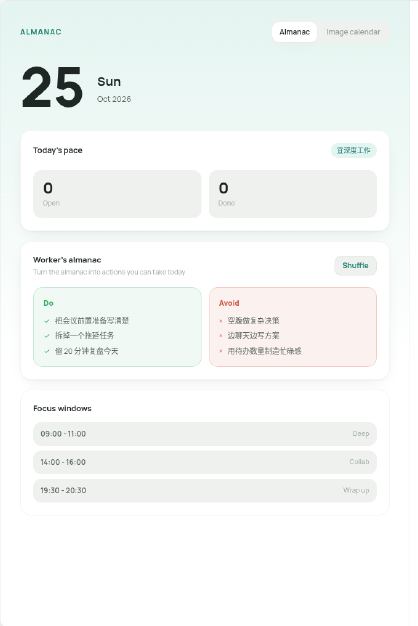
TickTick free treats calendar as a basic view over lists; agenda/day view and richer calendar sit behind Premium. Image calendar and Almanac are not on that axis — they answer “why open today,” not “add another month view next to the list.” To look once, use the image-calendar link above.
Goals and milestones: direction is more than a January note
Goals in Anpai are not a separate notes page. They are the context sitting behind the calendar cells.
You write yearly goals and the time you hope to put into them; you add milestones and log time spent, so progress is visible. When you place a block, you see more than “write the spec this afternoon” — you see why that block sits on this year’s direction.
What belongs here are things that cross weeks and months and keep returning to the calendar: shipping a product version, running a training cycle, pushing a side project past a checkpoint. One-off chores do not need to be promoted into goals. Goals exist so month / week / day have something to serve.
Weekly review + AI insights: review starts next week
When the week ends, Anpai asks you to look back, not only check forward.
Review looks at where time and energy went. AI insight marks the changes in that mix that actually matter — which kind of arrangement grew, which goal barely got a cell — and feeds those observations into next week’s plan. So review is not an archived summary. It is the third step of the loop: you cannot place next week until this week is visible.
That is a different question from “are all tasks done?” A list can be all green and the week still unreadable. Review asks whether the days pointed at the goals.
Anpai Agent: it works from your goals, schedule, and reviews
The Agent hangs on this loop. It is not an empty chat box. It works from your goals, existing schedule, and review record. The product is explicit about the boundary: it does not decide for you. It turns a fuzzy wish into a clear, doable next step. You keep the choice.
What we can say concretely:
- Natural-language scheduling: say the time and the thing; it lands on month / week / day. How Chinese time is heard, and when the system should ask, is in the pitfalls of Chinese time parsing.
- Goal breakdown: “finish the product spec this week” becomes a few steps that fit on the calendar, not a leftover sentence.
- Weekly insight: tied to review — read this week’s mix, then suggest the next.
- Context: suggestions carry the goals you already wrote and the hours already claimed. They are not a blank todo list invented from nowhere.
The marketing site has a concrete exchange: you say you want to finish a product spec this week, but every day is chopped up; the Agent looks at what is already on the calendar, suggests splitting the work into focus blocks, and locks one of them first. You can change it or ignore it. The Agent sits beside the calendar and the goals. It is not a second list product.
PC workbench and phone sync
One rhythm, two doors. After you sign into the same account, schedule, goals, reviews, and preferences travel together.
- PC (Web / macOS): month / week / day, yearly goals, the review center, and the Agent on one workbench. This is where you lay out a week, write a goal, or do a review. The web door is web.anpai.life.
- Mobile: capture a schedule item, check goal progress, take an Agent suggestion. The plan is not supposed to live only on the desk.
The hard part of this kind of product is usually sync, not the page. For why local-first, versions, and soft delete matter, see sync architecture for a todo app.
Start at web.anpai.life
The soft next step is one click: open web.anpai.life and look at your own month / week / day. Sign in the first time you add or edit. If you want the product story before you type, read www.anpai.life.
You do not have to migrate first. Add a goal, put one thing on today, look at today’s image calendar, or tell the Agent a sentence to schedule. That is enough to feel whether the loop fits.
TickTick free: already good, and it does cap
Back to the doorway. TickTick’s free tier is a complete todo app:
- 9 lists, 99 tasks per list
- List and board views
- Smart parse, reminders, multi-device sync
The upgrade page also lists finer free limits: attachments 1/day, checklist items 19/task, reminders 2, share members 2, habits 5, anniversaries 5. Calendar views are “basic” (基础) on free, unlimited on Premium. Agenda view is a Premium core feature: opening Agenda View brings an upgrade modal about planning the day, with an orange Upgrade Now button. That is not a claim that free calendar “doesn’t exist” or “has no month view.” Free still has a basic calendar; agenda/day view and the richer calendar / time-block features sit behind the paywall.
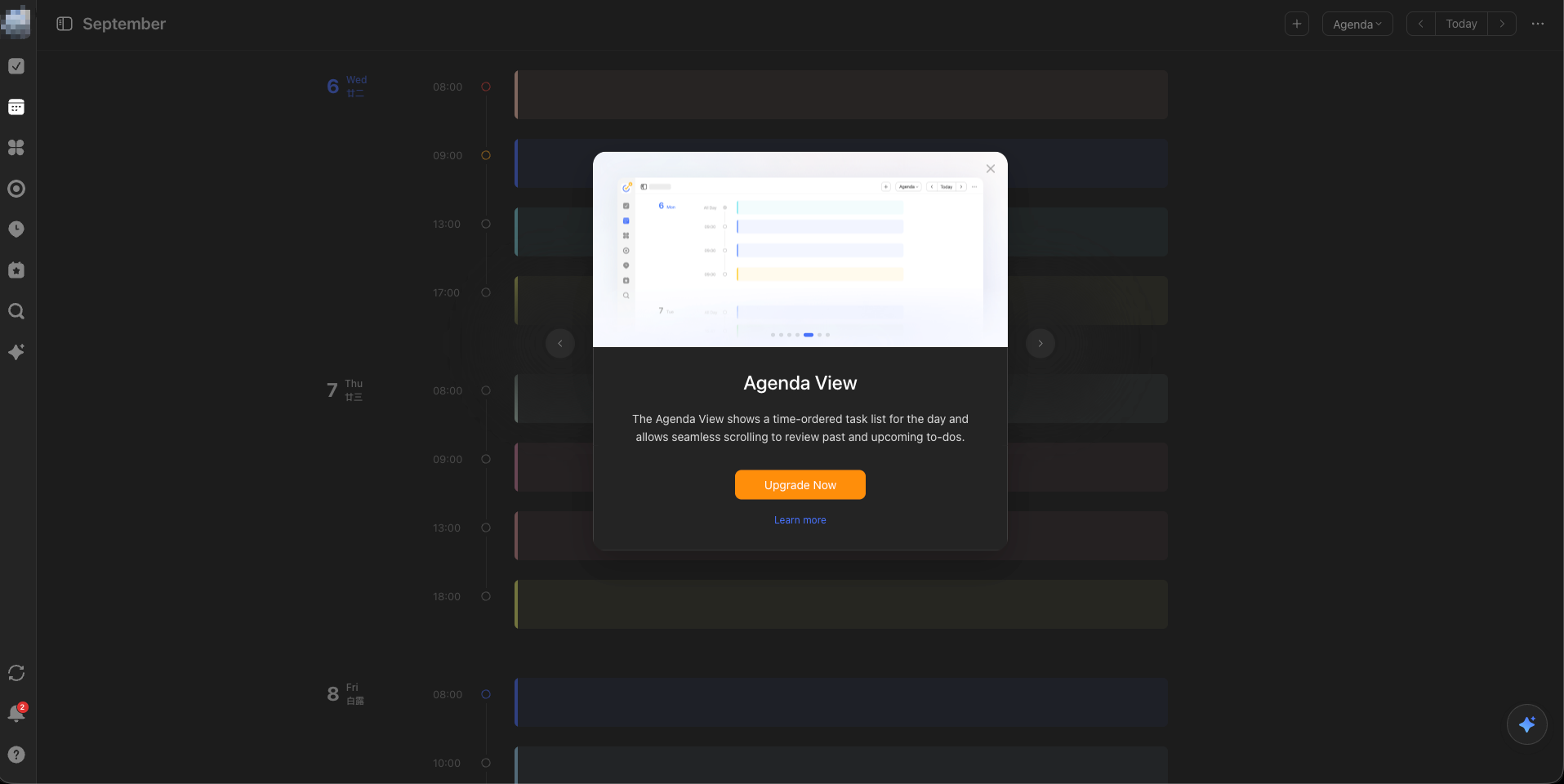
On Anpai, month / week / day are the home screen, with no upgrade wall. Open web.anpai.life and switch among the three. Sign-in appears the first time you add or edit. The contrast is “does agenda/day view cost extra,” not “does TickTick have a calendar.”
Premium, around ¥139/year, unlocks 299 lists, 999 tasks per list, plus richer calendar, task time blocks, WeChat reminders, themes, timeline, and more AI. For a heavy list user, that is a reasonable subscription.
Anpai does not try to match TickTick on list count, habit streaks, or checklist quotas. Those gaps are a different product line, not an unfinished clone. If you depend on TickTick’s habits or Pomodoro, or you treat a hundred lists as a knowledge base, Anpai is not a replacement today.
A comparison table that is not a clone chart
| TickTick free | Anpai.Life | |
|---|---|---|
| Center of gravity | Lists / tasks | Calendar + goals + review + Agent |
| What you open every day | Lists and boards | Month / week / day as home |
| Calendar views | Free is “basic”; agenda/day view is Premium | Month / week / day free; sign in when you edit |
| Image calendar / almanac | No counterpart; calendar is a view over lists | A daily AI poster; almanac gives do/avoid and focus windows |
| Where direction lives | Lists and tags you invent | Yearly goals, milestones, time spent |
| How a week closes | Check off tasks | Weekly review + AI insight, then next week |
| AI | More of it behind Premium | Agent: NL scheduling, goal breakdown, weekly insight; you decide |
| Habits / anniversaries / attachments | Explicit free quotas | Not the comparison axis |
| Sync | Multi-device | PC web / macOS + mobile; schedule, goals, reviews travel together |
| Next step | ~¥139/year to grow lists and calendar views | Try web.anpai.life; sign in on first edit |
The point is not a winner. Growing list quotas and walking a day → goal → review → next-step loop unstick two different kinds of stuck. They can coexist: TickTick as a quick inbox, Anpai as the week / goals / review bench.
FAQ
What is Anpai.Life?
Anpai.Life is a personal rhythm system — goals, schedule, review, and Agent in one continuous workflow. The closed loop is that the calendar makes days visible, the image calendar gives today a color, goals set direction, review keeps the lesson, and the Agent helps you see the next step. Start at web.anpai.life.
How is Anpai different from a list app?
It is not another list app, and it is not a calendar with a few plugins bolted on. The home screen is the month, week, and day calendar, not a view hanging off a list. The product center is calendar, goals, review, and Agent.
What are the image calendar and the Almanac?
The image calendar is one AI poster a day — solar date, lunar date, stem-branch, and solar term, plus that day's do/avoid and a quote. The Almanac turns the do/avoid into actions you can follow and marks a few focus windows.
Does the Anpai Agent decide for you?
No. The product is explicit about the boundary — it does not decide for you. It works from your goals, existing schedule, and review record, and turns a fuzzy wish into a clear, doable next step. You keep the choice.
How does TickTick free compare with Anpai?
TickTick free is already a complete todo tool (9 lists, 99 tasks per list, and more); agenda/day view and richer calendar sit behind Premium. Anpai's month, week, and day views are the home screen with no upgrade wall; it asks you to sign in the first time you add or edit. The two can coexist — TickTick as a quick inbox, Anpai as the workbench for the week, goals, and review.
Comments