MCP Dual Role: Client and Server Together on an AI Testing Platform
Inside an AI automated-testing platform we play both roles in the MCP ecosystem: as a Client, so the test agent can dispatch external tools across the company; as a Server, so the platform’s own testing capabilities become tools anyone can call. This post first explains MCP in three layers (what it is → what it says → how it is said), then walks through engineering practice on both sides, and finally recounts a real integration — from errors to the spec-compliant posture.
1. Opening: two MCP roles on one platform
We maintain an AI automated-testing platform for mobile and H5 products. Testers register the business under test; an AI agent generates cases from AI assets (Skills / Rules / Prompts); an execution engine then runs the full case in a web sandbox or on a real device and produces a report.
Once the platform matured, two pain points stood out:
- Inward: automated cases could not close a full loop. Mid-run we often needed to query order status, flip mocks, or check server-side data — capabilities scattered across other teams’ services that the test agent could not reach.
- Outward: the testing capabilities we had accumulated (manage tasks, query cases, start runs, fetch results) were only callable through a REST API that a few systems had hard-coded against. Plenty of agents in the company (AI coding assistants, internal copilots, automation pipelines) were built on MCP and still could not use us.
The interesting part: that pair of pain points maps exactly onto MCP’s two viewpoints:
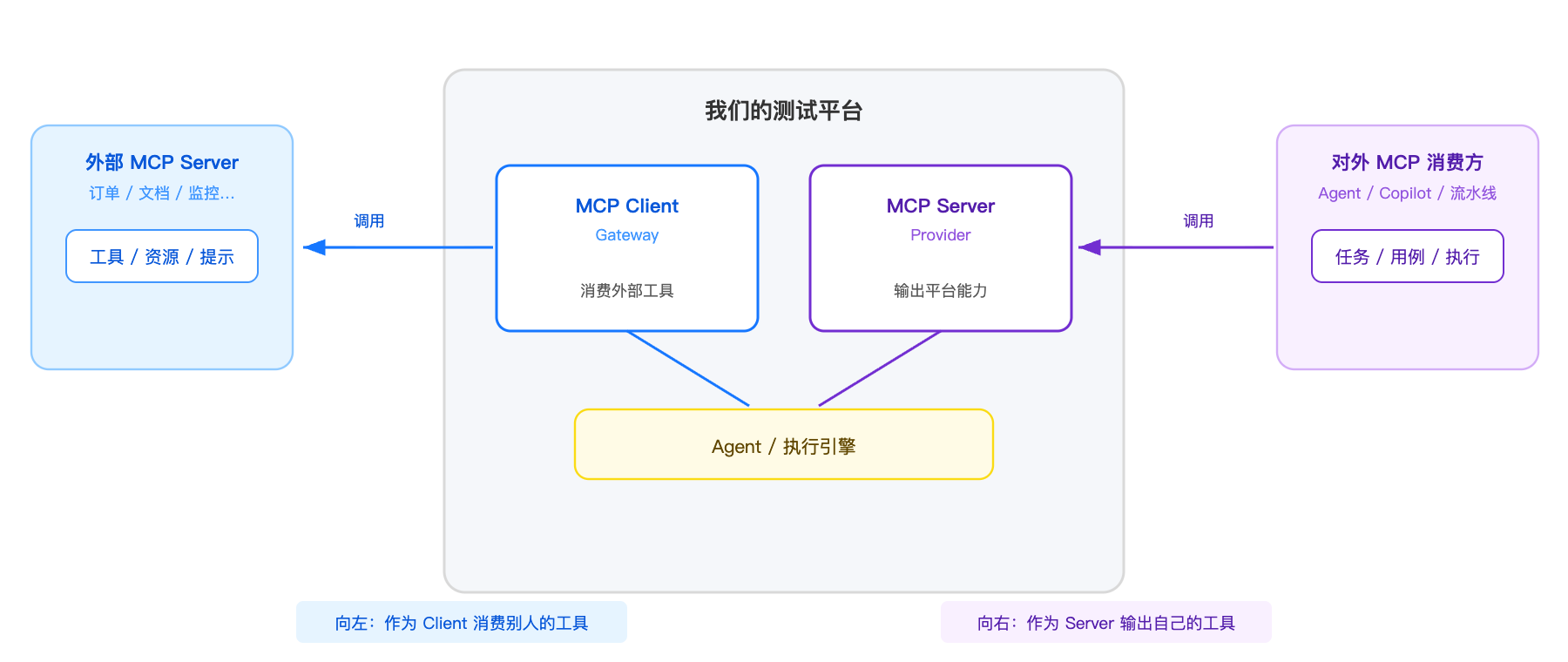
The same Node.js service faces left as an MCP Client and right as an MCP Server. The two sides were independent projects. The rest of this post follows “principles → Client → Server → integration postmortem”.
2. Three layers: a short MCP primer
This chapter climbs three layers: what the protocol is for (what it is) → what a message looks like (what it says) → how messages travel (how it is said). Each layer is short — just enough to read the engineering notes that follow.
2.1 Layer one: what MCP is, and who talks to whom
MCP (Model Context Protocol) is an open protocol that standardizes how an “AI application” connects to “external data sources / tools” — the USB-C port of AI apps. Both sides implement the protocol; any AI app can plug into any tool server.
First, align the three roles (the set of terms people mix up most):
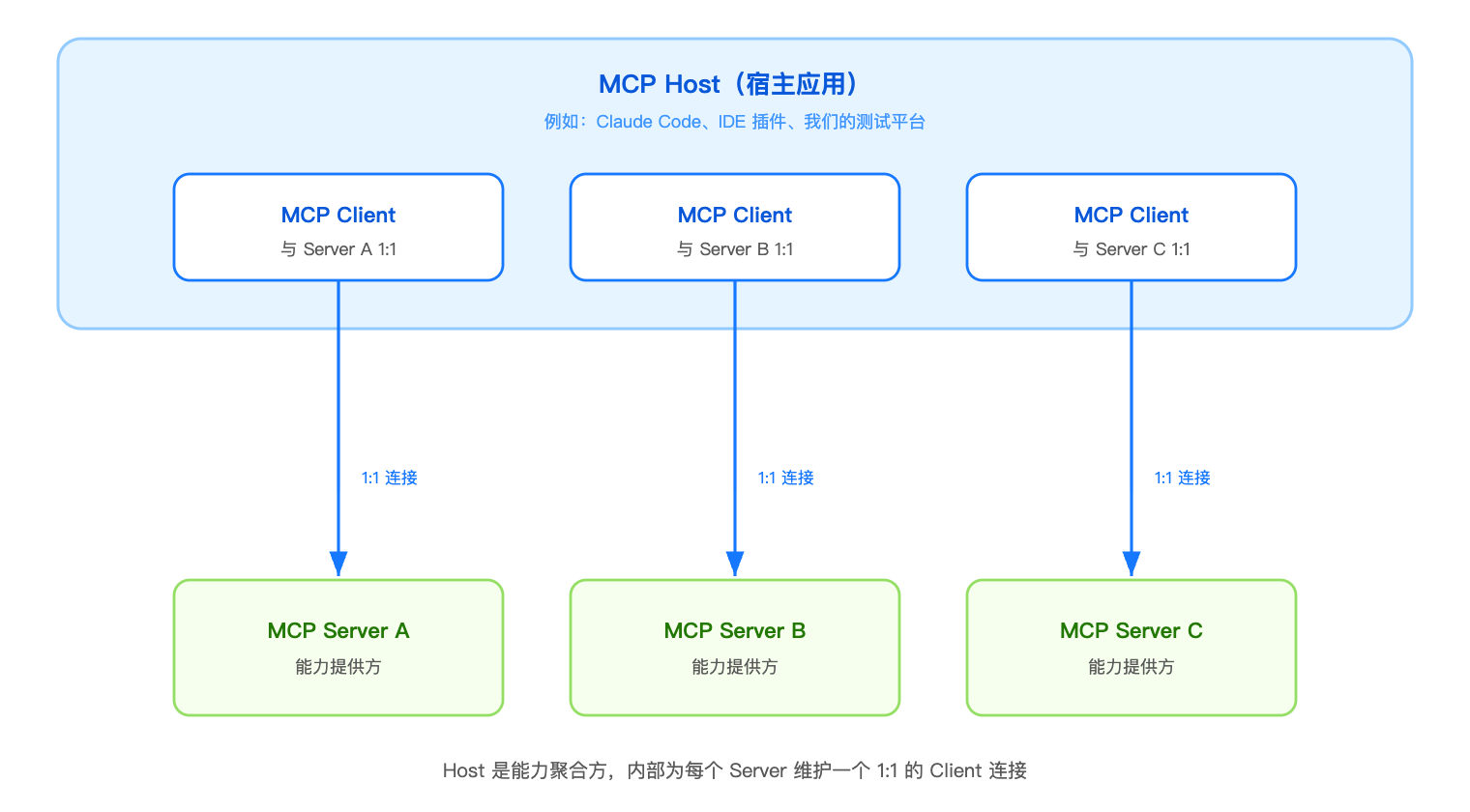
- Host: the AI application itself, the aggregator of capabilities (Claude Code, our testing platform);
- Client: a connector inside the Host that keeps a 1:1 connection with each Server — it is not “the whole app is one Client”;
- Server: the capability provider.
A Server exposes three kinds of primitives. The key difference is who is in control:
| Primitive | Who controls it | Common protocol methods |
|---|---|---|
| Tools | The model decides whether to call | tools/list (supports cursor pagination), tools/call, notifications/tools/list_changed |
| Resources | The application decides when to read | resources/list, resources/read (returns text/blob) |
| Prompts | The user actively chooses | prompts/list, prompts/get |
Most integrations are built around Tools. Both sides of this article are too.
2.2 Layer two: what a message looks like — JSON-RPC 2.0
Every MCP envelope is JSON-RPC 2.0. JSON is the data format (the envelope); JSON-RPC is the rule for mailing with that envelope. There are only three message kinds, and the test is whether id is present:
| Message | Has id? |
Expects a response | Example |
|---|---|---|---|
| Request | ✅ | Must reply | initialize, tools/list, tools/call |
| Response | ✅ (reuses the request id) | Received by the initiator | result and error are mutually exclusive |
| Notification | ❌ | Nobody expects a reply | notifications/initialized |
initialize handshake → capability negotiation
tools/call:
  → { "jsonrpc":"2.0", "id":3, "method":"tools/call", "params":{ "name":"...", "arguments":{...} } }
  ← { "jsonrpc":"2.0", "id":3, "result":{ "content":[ { "type":"text", "text":"..." } ] } }
Two engineering details show up again and again in the postmortem later:
- A tool result is a
contentarray (three types: text / image / resource). “Failed but recoverable” is marked withisError: true; only protocol errors go througherror. - A response must contain
jsonrpc+id+result/error. If the other side returns something else (plain REST JSON, for example), the Client fails to deserialize. Remember this contract — the two-dialect comparison in 4.2 and the auth practice in 4.4 both rest on it.
2.3 Layer three: who goes first — sequencing and Transport
Sequencing: every session starts on the same path — initialize (exchange protocol version and capabilities) → notifications/initialized → tools/list discovery → tools/call. Capability negotiation is mandatory: a method whose capability was never declared in initialize cannot be called.
Transport (how messages travel) comes in two flavors:
| Transport | Scene | Notes |
|---|---|---|
| stdio | Local integration | The Client launches the Server as a child process and talks over pipes. stdout is reserved for JSON-RPC — printing debug text there crashes the Client parser (debug must go to stderr) |
| Streamable HTTP (current spec) | Remote integration | A single HTTP endpoint (e.g. /mcp); every interaction is a POST. The response shape is one of two: a simple request returns application/json directly; a long task may upgrade to a text/event-stream — the Server decides, constrained by the Client’s Accept header |
Streamable HTTP replaced the first-generation dual-endpoint HTTP+SSE design, and the spec is moving toward “stateless” (drop sessions, drop replay, make each request self-contained). We come back to that architectural choice in chapter 6.
One last engineering fact: a remote Server must authenticate. The spec recommends OAuth 2.1; inside a company this is usually terminated at a shared gateway (the Client presents credentials to the gateway; the gateway authenticates and forwards the user identity to the backend Provider). “How identity crosses the gateway” is the most interesting design point in chapter 4.
3. Part 1 · As an MCP Client: let the test agent use company-wide tools
Bring chapter 2’s concepts back to practice: our platform is the Host (2.1); internally it keeps one Client connection per registered external MCP Server (the 2.3 handshake); the Tools it fetches are handed to the test agent (the tools/call semantics of 2.2).
3.1 Scene and principles
A typical scene: an H5 case reaches step 3 and needs “the order status for the orderId in the page URL” before it can assert. Before MCP, testers either looked the data up by hand or wrote a one-off integration for every business.
After MCP, the product shape is:
- Users self-register any remote MCP Server (URL + credentials) under “AI Asset Center → MCP”;
- The platform runs
initialize+tools/list, fetches that Server’s tool catalog, and archives it; - When generating a case the test agent can call these tools for data, or emit an
mcpCallstep so every run invokes them live; - When the execution engine hits that step, the platform server proxies the call to the external MCP Server and writes the result into a step variable for later assertions.
Four design principles kept us from wasting months:
| Principle | Notes |
|---|---|
| MCP is an AI asset | Server/Tool descriptions sit next to Skills/Prompts as an asset type; credentials are not assets — they belong to the current user’s Secret Manager |
| One call exit | Manual calls from the UI, autonomous agent calls, script execution, post-run actions — all funnel into the same server-side invoke(). Front-end JS, the agent model, and sandbox scripts are forbidden from talking to external MCP directly |
| Credentials never leave the server | Token/Secret/Header are stored only as ciphertext (AES-256-GCM; the entity holds just a credentialRef). They do not enter step JSON, prompts, the sandbox, or logs |
| Validate at execution time | No preflight before a task starts. If a call lacks permission, that step fails with a clear error code; the task is still allowed to start |
3.2 The key mechanism: serverKey and “config belongs to a person, tasks share a dependency”
An easy trap: tasks can be shared or handed off. Whose config and credentials do the MCP dependencies inside a task store?
Our answer: a task stores only serverKey + toolName, never config or credentials. serverKey is a stable fingerprint of a normalized URL (scheme+host normalized, default ports stripped, query sorted, sensitive query params rejected). Different users installing the same address get the same serverKey. At run time we resolve the connection and credentials as the current executor — an executor who has not configured that server gets a clear MCP_SERVER_NOT_CONFIGURED on that step, rather than borrowing the task author’s permissions.
Declarative mcpCall steps are generated by the AI agent and compiled by a deterministic compiler. Hand-writing them is forbidden:
{
  "stepIndex": 3,
  "type": "mcpCall",
  "mcp": {
    "serverKey": "mcp_order-query_7f3a2c91",
    "toolName": "query_order",
    "inputBindings": { "orderId": { "source": "page.url", "path": "orderId" } },
    "saveAs": "orderQueryResult",
    "failurePolicy": "required"
  }
}
Input bindings support fixed values, page context, and earlier step variables — users never write an extraction script.
3.3 A unified invocation path
Every entry (manual / agent / scripted run) shares the same sequence:
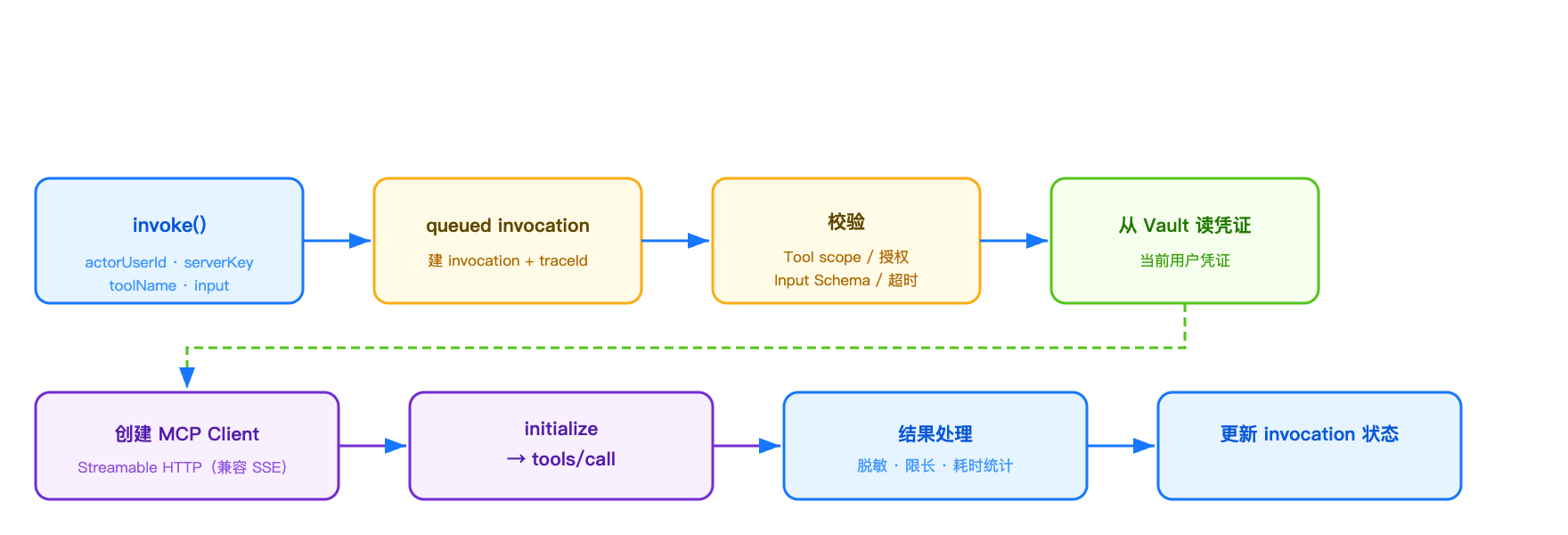
On the agent side, a thin adapter dynamically wraps a personal MCP Tool as a standard Tool in the platform ToolRegistry, so the agent decides when to call it.
4. Part 2 · As an MCP Server: turn testing capabilities into company-wide tools
4.1 Requirements and the tool catalog
The platform-side goal: external agents discover and call the testing platform through MCP. The first-wave catalog is deliberately narrow — “stable product capabilities”:
| Tool | Type | Notes |
|---|---|---|
list_test_tasks / get_test_task |
Read | List / view test tasks the caller can access |
list_test_cases / get_test_case |
Read | Case catalog and details under a task |
get_test_run / get_execution_result |
Read | Batch progress / a single run’s result summary |
start_test_run |
Write | Start a test run asynchronously, return a runId, with an idempotency key |
The catalog is clean of any “low-level capability”: no database queries, ADB, shell, file I/O, or arbitrary HTTP proxy. An MCP tool is a productized interface, not a pass-through to the database.
4.2 Phase one: MCP-Lite REST — first, compare the two dialects
The company built a unified MCP gateway for Client-facing auth and session management. Providers can join in two ways: the simplified protocol (MCP-Lite) or proxying an existing standard MCP Server (Streamable HTTP).
The fastest way to understand them is to look at the same action (tools/call) in both dialects:
Standard MCP (JSON-RPC — the dialect the enterprise gateway speaks to MCP Clients):
  POST /mcp
  { "jsonrpc":"2.0", "id":3, "method":"tools/call",
    "params":{ "name":"get_test_task", "arguments":{ "taskId":"..." } } }
  ← { "jsonrpc":"2.0", "id":3, "result":{ "content":[...], "isError":false } }

MCP-Lite (the dialect the gateway uses when calling back to a Provider):
  POST /mcp/tools/call
  { "name":"get_test_task", "arguments":{ "taskId":"..." } }
  ← { "content":[...], "isError":false }
The semantics are identical. MCP-Lite just tears off the JSON-RPC envelope and flattens the method into the URL, so a Provider can implement it with an ordinary web framework. Our first version was MCP-Lite (a thin wrapper around the official SDK; registering 7 tools was about 130 lines). The gateway also injects the current SSO user identity (user.empId and other extension fields) into the tools/call body, so the server can enforce data permissions as the real user.
That version also shipped a full “governance quartet” — the real extra work that makes an MCP Server different from a plain REST API:
- Identity resolution and ownership checks: caller → principal → resource ownership.
get_test_taskcan only hit tasks the caller owns or has been shared; - Idempotency:
start_test_runrequires anidempotencyKey. Same key + same args returns the first result; same key + different args throws a conflict; - Rate limits and timeouts: a concurrency cap, a 15s per-call timeout, and size limits on arguments and results;
- Audit and origin marking: every request is tagged
callSource=mcp+ tool name + caller + traceId, distinguishable from CLI/Web in the same log system.
4.3 Phase two: add a standard Streamable HTTP endpoint
To let any standard MCP client connect directly (not only through the gateway), we wrapped the same tool catalog again with the official StreamableHTTPServerTransport and exposed a standard JSON-RPC endpoint at /mcp/http:
// stateless mode: one transport per request, no session (the direction of travel; see chapter 6)
const server = createServerWithRegisteredTools();   // reuse the 7-tool registration
const transport = new StreamableHTTPServerTransport({
  sessionIdGenerator: undefined,          // ← no session
  enableJsonResponse: true,               // simple requests return JSON directly
});
ctx.res.once('close', () => transport.close());
await server.connect(transport);
await transport.handleRequest(ctx.req, ctx.res, parsedBody);
ctx.respond = false;   // the transport writes the response itself
The incremental code was under 100 lines, and tool registration did not change — because phase one had already split “tool definition” from “protocol exposure”. The server now speaks two dialects: MCP-Lite (for gateway origin calls) and standard Streamable HTTP (for any MCP client).
4.4 Joining the unified gateway: two paths and injected-header auth
When hanging the Server on the unified gateway there are two orthodox paths (we shipped both):
- Path A · MCP-Lite: register as HTTP, point at the MCP-Lite endpoint. Thinnest implementation (two REST interfaces). User identity is injected by the gateway in the
tools/callbody. - Path B · Proxy an existing standard MCP Server (our final shape): register as Streamable HTTP, point at
/mcp/http. For internal auth, do not invent a private Authorization protocol. Follow the gateway spec and configure two injected headers under “Server options”:
mcp.headers.X-Api-Key=<agreed server-side secret>     # fixed header: on every request, proves "this came from the gateway"
mcp.headers.SSO-Emp-Id=$ctx.user.empId      # dynamic header: injects the currently logged-in user when a tool is called
The server checks X-Api-Key (constant-time equality with an env secret). User identity prefers the injected employee id, and falls back to a token-bound fixed identity when it is missing (for local debugging). Launch verification matrix:
initialize (correct X-Api-Key)            → 200  serverInfo returns normally
tools/call + dynamic header = user A (owner)  → 200  returns user A's own task list
tools/call + dynamic header = user B (no resources)    → 200  total=0  ← data permission isolated to the real caller
wrong X-Api-Key                        → 401  JSON-RPC error
Two easy-to-miss launch prerequisites: the Provider domain must be on the gateway allowlist; credentials go in request headers and encrypted storage, never in the URL (gateway logs record URLs in plaintext).
5. Verification and release strategy
On both sides we insist “local all-green before staging, staging matrix green before release”. The differentiated matrices:
| Layer | MCP Client | MCP Server |
|---|---|---|
| Local | tsc + build + targeted tests (Gateway/Compiler/Adapter) + full regression | initialize/tools/list/tools/call smoke + three-state auth cases + user-isolation cases |
| Staging | Real credentials against an external Server; run a task that contains mcpCall steps |
Gateway connectivity → tool discovery → calls with injected identity → wrong-key negative |
| Governance | invocation records + traceId + redacted lengths | callSource audit + idempotency keys + a finite catalog |
On release: the MCP Server Provider follows the regular CI/CD pipeline. Gateway registration, domain allowlisting, and request-header config are release prerequisites independent of code — putting them on the checklist saves a lot of back-and-forth.
6. Spec evolution: going stateless, and why we were already facing the right way
After Streamable HTTP, the MCP spec is still moving. The theme is one word: stateless — drop protocol-level sessions (Mcp-Session-Id), drop the mandatory initialize handshake, drop replay, and make every request fully self-contained (version and capabilities travel in the request _meta).
Why this is worth watching:
- Horizontal scale: no sticky sessions; any instance handles any request; scale-out needs zero migration;
- Serverless-friendly: only a self-contained request can cold-start on demand;
- Easier debugging: each request can be replayed with curl; there is no in-flight state to restore.
Back to our implementation: StreamableHTTPServerTransport({ sessionIdGenerator: undefined }) is exactly the official SDK’s stateless mode — a new transport per request, done when the response is written, no leftover session. With enableJsonResponse: true, fast requests go JSON and long-running responses can still upgrade to a stream — aligned with where the spec is going. The stateless choice we made to keep things simple happened to sit on the path the spec is taking; even after the spec lands fully, the server will barely need to change.
SSE still works when you are stateless; its role just changes: from “a standing channel bound to a session” down to “the response shape of a single request” (stream lifetime = request lifetime). Our read tools are short requests, so enableJsonResponse can stay on JSON. Consider streaming when a long task appears.
7. Lessons
- One platform can be Client and Server at the same time. Once both sides share a clean boundary between “tool definition” and “protocol”, the marginal cost of a new protocol is tiny;
- Decide “who owns the credential” first. On the Client, credentials are isolated per person and encrypted. On the Server, identity is injected by the gateway — never trust a self-reported identity in the body;
- Write tools must carry an idempotency key. Async execution returns a
runIdinstead of waiting for the result — in the agent world, timeout-and-retry is the default; - Keep the tool catalog restrained. Expose “stable, productized interfaces”, not a database pass-through;
- When the protocol does not match, look at the response shape first.
jsonrpc=nullmeans the other side is not a JSON-RPC service at all; match the endpoint type; - Gateway-proxy internal auth uses injected headers — a fixed header proves origin, a dynamic header carries the user. Do not invent a private Authorization protocol;
- Pick protocols that sit on the spec’s main line (for example Streamable HTTP’s stateless mode). The spec is moving; following it means no rework.
8. Next
- Client side: dynamic-client OAuth 2.1 (zero-config auth for general-purpose AI coding tools), and team-level sharing policies for MCP assets;
- Server side: high-risk tools (stop a run) opened behind an approval gray release; quality scans and option-level coverage for tool descriptions; outbound trusted identity (M2M) to more downstreams.
MCP’s value is a standard interface for interoperability. When a platform can both “dispatch company-wide tools” and “be dispatched by the company”, AI testing is finally growing on the ecosystem rather than beside it.
Note: this is an external technical-sharing version. Internal platform names, domains, credentials, and business data have been generalized or redacted.
Further reading
For the protocol itself, see MCP intro. On the same agent capability chain, reading knowledge is in RAG; cross-agent collaboration is in A2A.
Comments