Integrating DeepSeek Tool APIs into Anpai Architecture and Implementation
Integrating DeepSeek Search, Fetch, OCR, ASR and TTS into Anpai led us to change three parts of the architecture: search now runs inside the Agent tool loop, extracted document text is archived with the conversation, and answer paths share conversation history and a turn-level time context. The following examples follow the actual call chain, with error handling and business fields omitted where noted.
1 Integration points and API responsibilities
Core holds the API key and calls the standalone tool endpoints. Reasoning continues through our existing Agent pipeline. DeepSeek also supports enabling tools within model requests and handling their orchestration server-side. We chose to orchestrate the standalone APIs because Anpai needs search and calendar tools in the same loop. Official integration options
| Capability | Endpoint called by Core | Role in Anpai |
|---|---|---|
| Search | POST /v1/tools/search | Agent tool web_search |
| Page reading | POST /v1/tools/fetch | Agent tool read_webpage |
| OCR | POST /v1/tools/ocr | Extract attachment text before reasoning |
| ASR | POST /v1/tools/asr | Fill the editable composer with a transcript |
| TTS | POST /v1/tools/tts | Read the completed answer aloud |
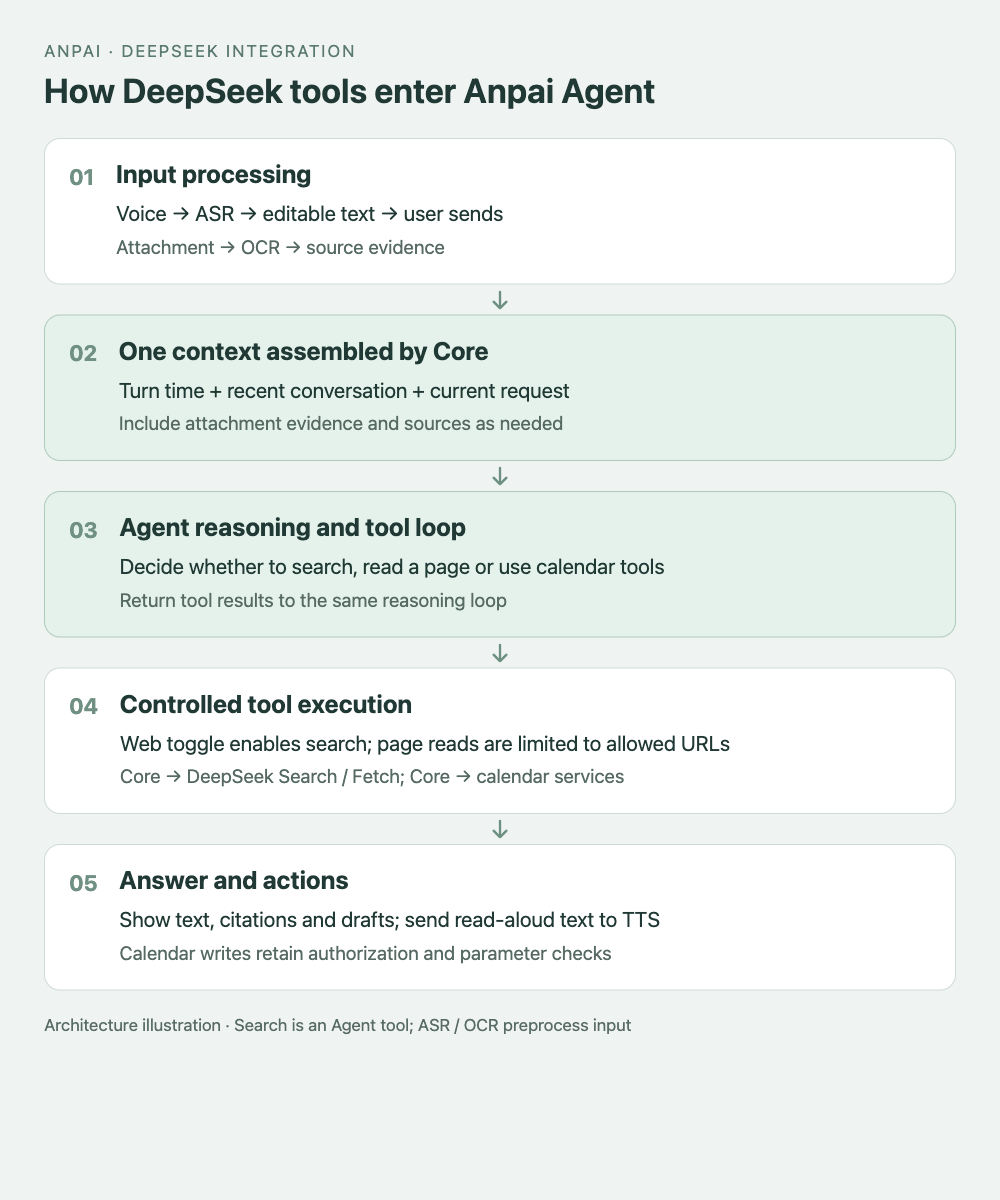
This diagram shows the implemented responsibilities. Search results return to the tool loop; OCR text and voice transcripts enter through input processing.
2 Register search tools for each turn
Search and page reading are conditional paths. With search enabled, the Agent can answer directly, search, read a source page, or retrieve more evidence. Turning active search off still permits reading a URL explicitly supplied by the user.
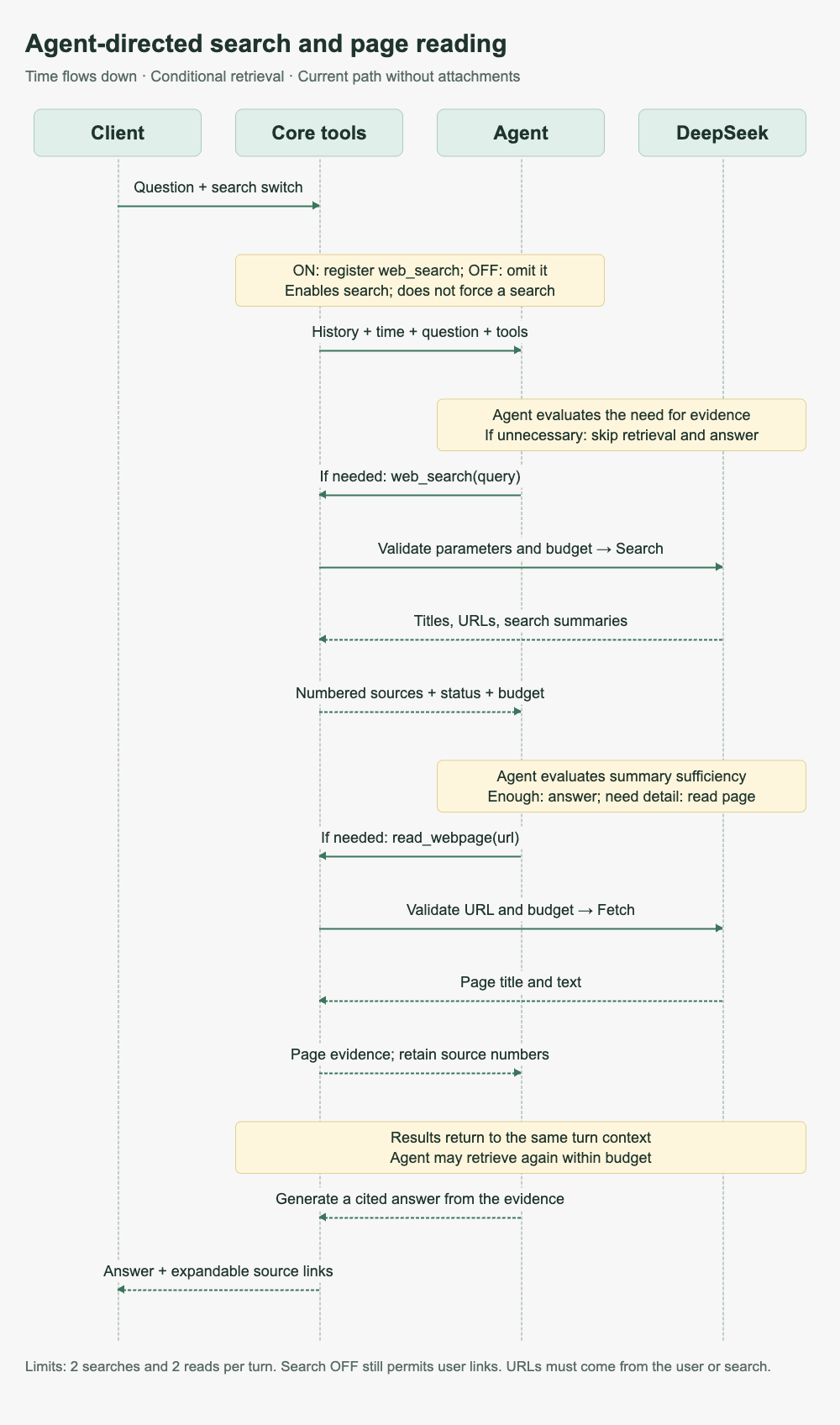
The search switch controls whether web_search is registered for the turn. The model receives its description and parameter schema, then decides what to query, when to call it and whether to read a page. This structural excerpt from AgentWebTools.tools() omits the execute body and optional timezone field:
if (this.searchEnabled) tools.push({
  name: 'web_search',
  label: '联网搜索',
  description: 'Search the public web with your query.',
  parameters: {
    type: 'object',
    additionalProperties: false,
    required: ['query'],
    properties: {
      query: { type: 'string', minLength: 1, maxLength: 128 },
    },
  },
  executionMode: 'sequential',
  execute: async (_id, params, signal) => { /* 调用适配层 */ },
});
The loop below is pseudocode. Tool results must be associated with their call IDs using the chosen SDK’s protocol:
while (withinTurnBudget()) {
  const response = await model.generate({ messages, tools });
  if (!response.toolCalls.length) return response.text;

  messages.push(response);
  for (const call of response.toolCalls) {
    const result = await executeValidatedTool(call);
    messages.push(toToolResult(call.id, result));
  }
}
Each turn creates an AgentWebTools instance holding counters, a source array and an allowed-URL set. Execution is limited to two searches and two page reads. Readable URLs come from user input or that turn’s search results. Disabling active search still allows reading explicitly supplied links.
Tool results include status, the time context, numbered sources and the remaining budget. This is an illustrative response shape, not a recorded search:
{
  "status": "ok",
  "timeContext": { "...": "本轮时间快照" },
  "sources": [
    {
      "number": 1,
      "title": "示例图书馆开放时间",
      "url": "https://example.org/hours",
      "text": "来源正文",
      "evidenceType": "webpage"
    }
  ],
  "remaining": { "searches": 1, "reads": 1 }
}
collect() merges sources by URL. Replacing a search summary with page text preserves its source number, so [1] continues to identify the same page. The frontend keeps inline citations and puts titles and links in a collapsed source list. Page content is marked as untrusted evidence; that input boundary does not make a prompt instruction an absolute security guarantee.
3 Assemble context through a shared path
One failure made the missing context obvious: after searching, the assistant offered to create a reminder. The user replied “yes,” but the assistant asked what to schedule. The search and attachment paths had not carried the full history forward. The previous 800-character per-message cutoff could also remove the assistant’s closing proposal.
The repaired paths use shared history selection and role conversion. The following pseudocode illustrates the context components; its field names describe responsibilities:
const context = {
  system: agentInstructions,
  time: turnTimeContext,
  history: selectConversationHistory(recentMessages),
  evidence: attachmentTextAndToolResults,
  currentMessage: userMessage,
  tools: enabledTools,
};
The archive loads the latest 30 messages. A 48,000-character history budget groups turns starting with user messages and selects complete turns from newest to oldest. If the newest turn alone exceeds the budget, the beginning and end of each message are retained with an omission marker. This limits historical text, not total request tokens, and does not implement semantic summary compression.
A time snapshot is created once at request entry. Its actual type is:
export interface TurnTimeContext {
  readonly startedAt: string;
  readonly timezone: string;
  readonly localDate: string;
  readonly localTime: string;
  readonly weekday: string;
  readonly selectedDate?: string;
}
AsyncLocalStorage carries the snapshot downstream. If the query location becomes known later, deriveTurnTime() converts the original startedAt into that timezone instead of reading the clock again. A request started at 23:59 and completed at 00:01 therefore retains one reference instant. selectedDate separately identifies the date visible in the calendar, keeping “that day” distinct from “today.”
The Agent reasons about which proposal “yes” refers to, or which date anchors “tomorrow” in an invitation. The server continues to enforce ownership, valid parameters and calendar write constraints.
4 Handle empty OCR results and archive the evidence
The current image path runs OCR first, then passes text to the Agent. The diagram describes application calls, not DeepSeek’s internal vision architecture. The answering model does not receive the original image.
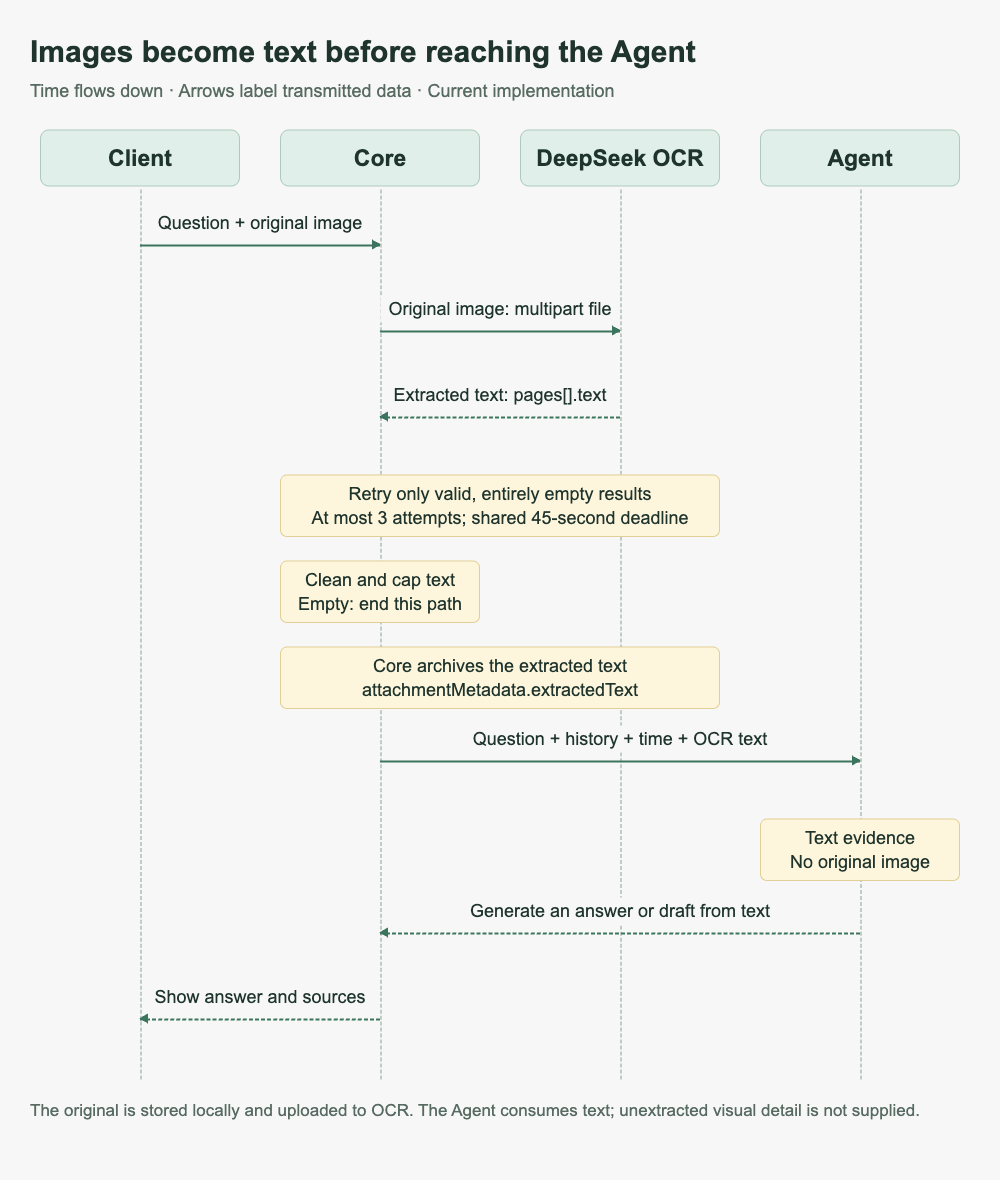
OCR uses a multipart request containing file and purpose=text_recognition. We observed HTTP 200 responses with empty text on every page, so success is checked against pages[].text.
This excerpt shows the core logic in recognizeDocument():
const deadline = AbortSignal.timeout(45_000);
const recognitionSignal = signal
  ? AbortSignal.any([signal, deadline])
  : deadline;

for (let attempt = 0; attempt < 3; attempt++) {
  recognitionSignal.throwIfAborted();
  result = await (
    await this.post('ocr', form, recognitionSignal)
  ).json();

  if (result?.error || !Array.isArray(result?.pages) ||
      result.pages.some(page => typeof page?.text !== 'string')) {
    throw new ServiceUnavailableException('Document recognition failed');
  }
  if (result.pages.some(page => page.text.trim())) break;
}
The three attempts share a 45-second deadline. Only structurally valid, entirely empty responses are retried; transport and schema failures raise errors. If all attempts remain empty, the method returns no sources rather than fabricating recognition success. Extracted text is capped at 14,000 characters and marked incomplete when truncated.
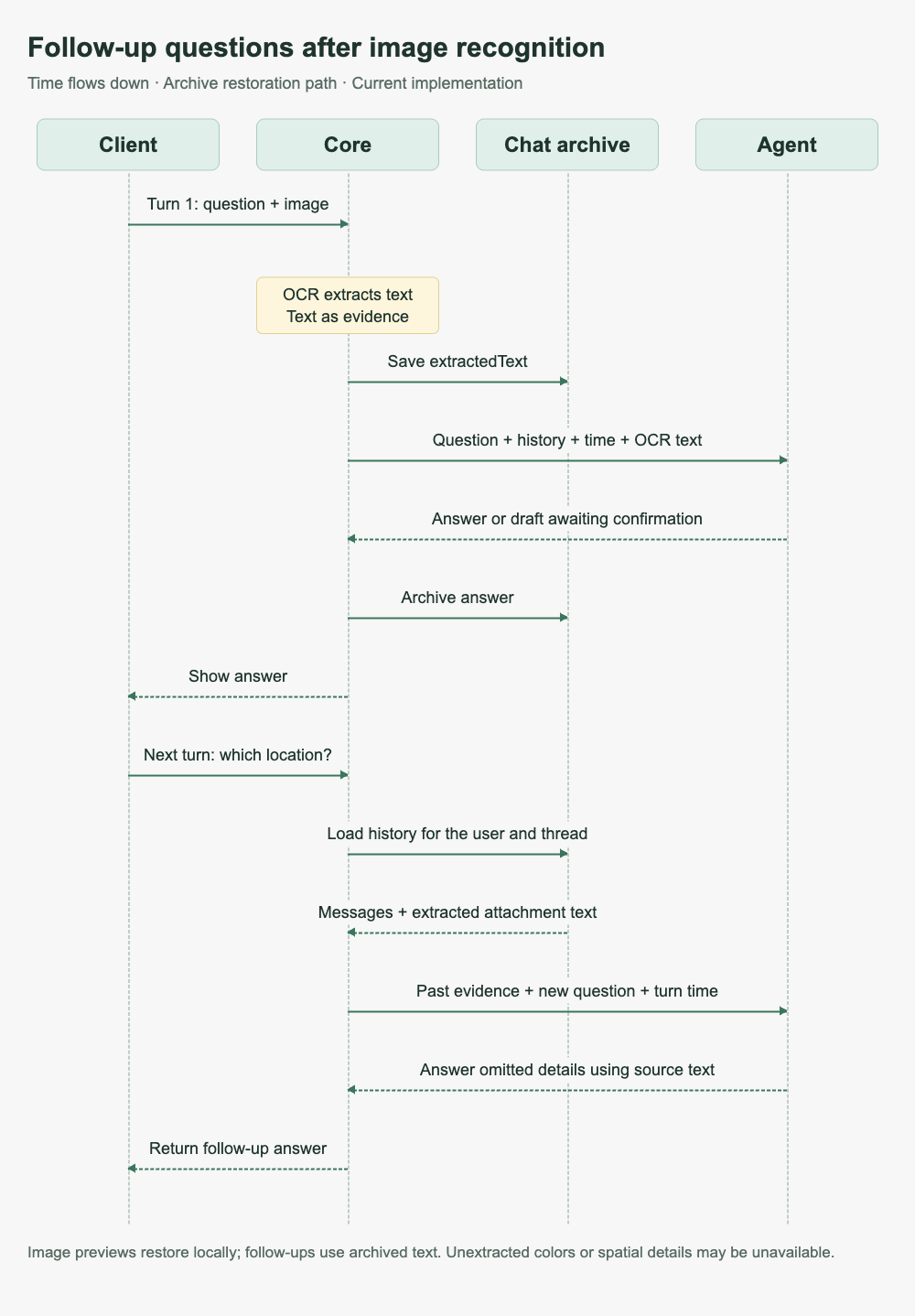
A separate failure appeared on the next turn: OCR had extracted a location, but the assistant’s answer omitted it. Archiving only the answer left no evidence for a later location question. Extracted text is now stored in the attachment metadata:
attachmentMetadata: {
  name: string;
  type: string;
  size: number;
  sha256: string;
  extractedText?: string;
} | null;| Data | Storage | Purpose |
|---|---|---|
| Original file | Local device; IndexedDB on Web | Restore attachment display and preview |
| File metadata | Server conversation archive | Identify attachments and associate messages |
| extractedText | Server conversation archive | Recover text evidence for follow-up questions |
The original image is not persisted in server object storage, but it is uploaded to the OCR service for recognition. Switching devices or clearing local storage requires selecting the original file again. To verify evidence recovery, ask about a detail present in the OCR text but absent from the previous answer.
Recognition and the follow-up happen in separate turns. The second turn restores extractedText from the conversation archive without another image upload or OCR call. Recovery remains subject to the history-loading budget.
5 Voice input and streaming PCM playback
ASR follows “record → transcribe → editable composer → manual send.” The time snapshot is created when the user sends. Direct recording-to-calendar code is retained but disabled in this release.
Read-aloud sends the completed answer to TTS. The server request is:
const response = await this.post(
  'tts',
  { text: input, format: 'pcm' },
  signal,
);
// 校验 Content-Type 包含 audio/pcm 后返回响应流
return response.body;
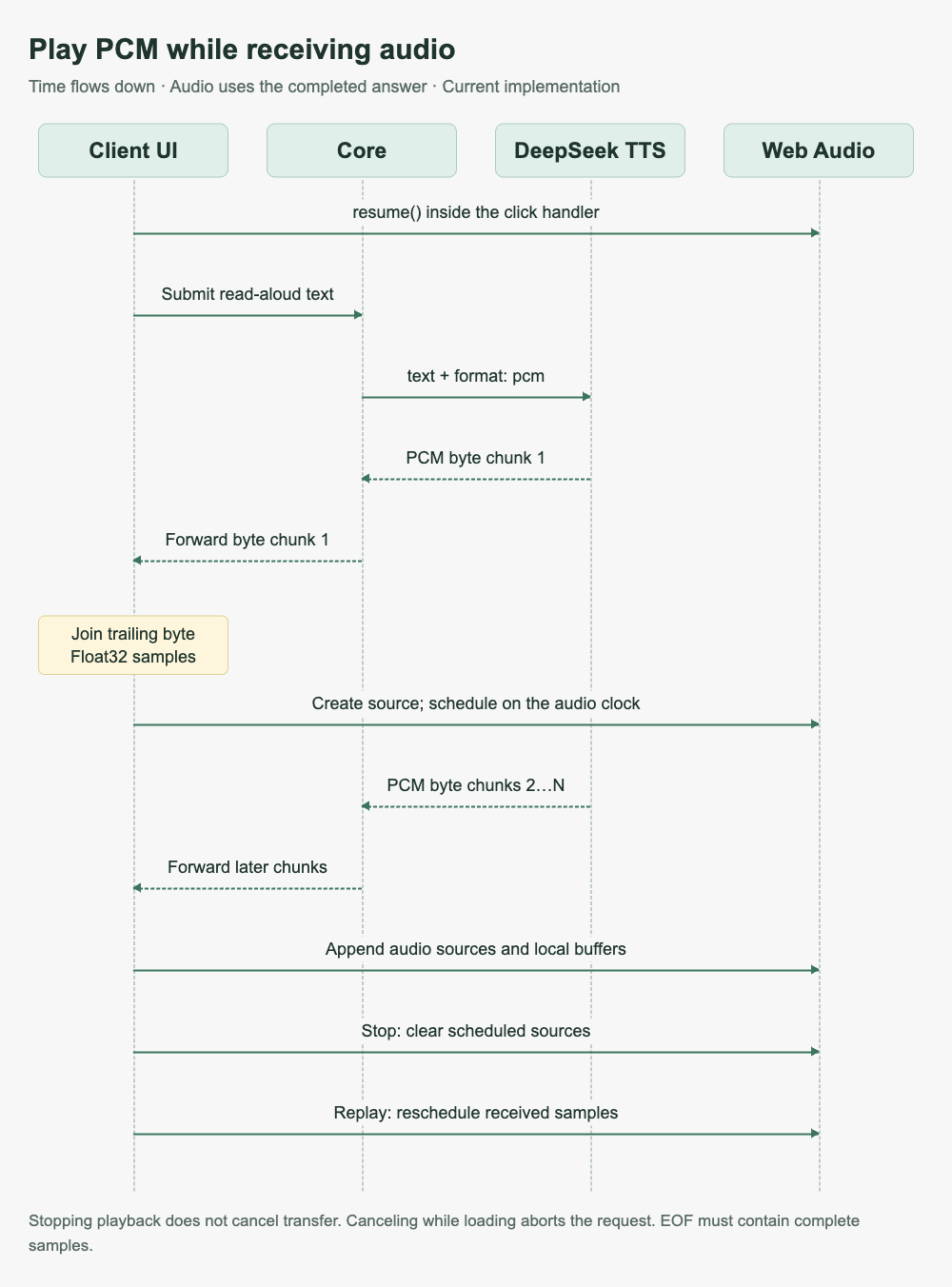
Read-aloud input is currently limited to 2,000 characters. The browser processes mono, 24 kHz, 16-bit little-endian PCM and queues incoming audio through Web Audio. An easy detail to miss: a network chunk can split a two-byte sample.
PCM stores consecutive sample values; network boundaries need not align with sample boundaries. The diagram shows playback of early data interleaved with later transfers. Every chunk goes through byte joining, conversion and scheduling.
This excerpt comes from AgentPcmPlayer.push():
const joined = this.tail === null
  ? bytes
  : Uint8Array.from([this.tail, ...bytes]);
this.tail = joined.length % 2 ? joined[joined.length - 1] : null;

const count = Math.floor(joined.length / 2);
const view = new DataView(joined.buffer, joined.byteOffset, count * 2);
const samples = new Float32Array(count);
for (let i = 0; i < count; i++) {
  samples[i] = view.getInt16(i * 2, true) / 32768;
}
Playback uses the audio clock to prevent adjacent chunks from overlapping:
const at = Math.max(this.nextTime, this.context.currentTime + 0.08);
this.nextTime = at + buffer.duration;
source.start(at);
AudioContext.resume() runs inside the click handler, before waiting on network I/O, to accommodate WebKit playback restrictions. Stopping clears scheduled audio sources; received samples remain available for replay. A small speaker control indicates loading, playback and stop states.
First-sound timing is recorded when the first non-silent sample is expected to play, rather than when the HTTP response arrives. This is an application-side audio-clock metric, not a physical measurement at the speaker. The implemented stream is TTS audio playback from an already completed text answer.
6 Verify conversation continuity and calendar writes
| Test path | What to verify |
|---|---|
| Search → short confirmation → time change | History roles and the prior proposal remain available; tools continue |
| OCR → refresh → ask about an omitted detail | extractedText is reloaded |
| Attachment → draft → confirm → calendar readback | No write before confirmation; repeat confirmation creates no duplicate |
| Midnight boundary and timezone conversion | Downstream steps retain startedAt; selectedDate stays independent |
| Read aloud → stop → replay | Sources stop, buffered audio replays, and first-sound timing uses one definition |
Production regression covered nine real API conversation turns. Web testing included continuation after refresh, confirmation and calendar readback; the production macOS build was checked for conversation continuity and pending drafts. Midnight and daylight-saving boundaries were tested automatically. Production observation also identified an older offline-sync retry issue, tracked separately.
History still uses recent turns plus a character budget. Summaries that preserve pending work, commitments and sources, together with long-term memory retrieval, remain future work.
Implementation entry points: agent-web-tools.ts, conversation-context.ts, turn-time-context.ts, deepseek-tools.service.ts, chat-archive.service.ts, and agent-pcm-player.ts. See the official Build a Chatbot guide. Official references were checked on November 15, 2026.
Comments